Logan Accessibility Library
•What technology are they using and / or what changes have been made?
The Logan Accessibility Library was purpose designed and built, opening in 2008.
The Accessibility Centre provides:
- Five Personal Computers with a variety of adaptive technologies, including trackball mouses, and adaptive keyboards including: large format keyboards, keys-u-see keyboards (large print white on black), and Intellikeys keyboards.
- A Two height automatic height adjustable table incorporating PC desks which are suitable for wheel-chair users.
- A Clearview CCTV magnifier digital model as well as handheld magnifiers with Eschenbach LED lenses and a universal handle.
- A Beamz music system for interactive music sessions, and a Tapit touch accessible platform
- The software provided includes Texthelp Read & Write Gold, Zoomtext, Boardmaker Plus, and a suite of software aimed at life skills, English language skills, numeracy skills, and motor skills.
(Fitzgerald, B., Hawkins, W., Denison, T. and Kop, T. 2015)
•How does it work?
As the centre was designed and purpose built, it was constructed so that all patrons could independently access the area during library opening hours. Staff have been trained to assist users with an introduction to the equipment/software available or troubleshoot any concerns or issues for existing users. Complementary programs and services are provided by outsourced specialists utilising these spaces that patrons are familiar with (“Logan City Council Libraries”, 2020).
•Who it benefits?
Located at the Logan North Library, south of Brisbane toward the Gold Coast, according to their website, Logan’s Accessibility Centre is designed to meet access needs for people with temporary or permanent disabilities, whether they be physical, neurological, psychological, or around literacy issues.
Overall, this purpose-built library building has brought disability access and the provision of appropriate technology into the building design process and created a digitally inclusive environment for all their community to benefit from in doing so.
•What are the implications for the information service?
This process of having a purpose-built facility that has incorporated accessibility into its design also makes it likely that libraries such as Logan North will remain important community centres for their entire community. Whilst staff may be required to undertake additional training for these areas this is no different to the additional training required to keep up with technology in general.
•Are there any other considerations?
According to “Logan City Council Libraries” (2020) the Logan library has also considered how their users will be able to physically gain access to their Accessibility Centre space by providing wheelchair access, accessible parking, lift access (with Braille control panels) and stair access and having a wheeled walking aid available.. If they are unable to access the centre in person, there is the option of a home Library Service where their volunteers can deliver library materials to resident’s homes.
While utilising the facility they are also provided with personal needs facilities such as their accessible toilets. Additional services and programs are also offered to support their users such as a Broadband for Senior’s Internet kiosk and Auslan classes via Deaf Services Queensland.
References
Fitzgerald, B., Hawkins, W., Denison, T. and Kop, T. (2015), “Digital Inclusion, Disability, and Public Libraries: A Summary Australian Perspective”, Accessibility for Persons with Disabilities and the Inclusive Future of Libraries (Advances in Librarianship, Vol. 40), Emerald Group Publishing Limited, pp. 213-236. https://doi-org.access.library.unisa.edu.au/10.1108/S0065-283020150000040019
Logan City Council Libraries. (2020). Retrieved 24 March 2020, from https://loganlibraries.org/
Advantages and disadvantages of having a statewide centralised LMS.
My thoughts………………………….
Advantages of a statewide centralised LMS
From the perspective of South Australian library patrons, what could be better than a one stop library? Books can be picked up and dropped off at any location, the widest range of choices possible, more unique and variety titles readily available as libraries across the state all share their collections. No more inequality with city patrons or wealthy suburbs having more funding, books, and choices than their country or poorer suburbs counterparts, anyone in the state can freely access the same resources equally.
Similarly, libraries benefit from the shared buying power, making purchases more economical resulting in more from their limited budgets. Especially country libraries who previously may have had reduced budgets, resources and limited availability qualified staff, which are harder to find in their smaller communities. Instead they are now more economical to run, while their patrons have extra availability of a wider variety of resources with access to specialised staff without worrying about their proximity to the location.
Library spaces around the state are now unclogged from the storage of books that sat on their shelves waiting to be borrowed by local patrons, they now have the opportunity to provide for collaborative spaces and services. Free from the buying and cataloguing processes, library staff can spend their time assisting and supporting their local patrons and community.
Disadvantages of a statewide centralised LMS
Putting all your eggs in one basket might seem like a great plan but if the basket breaks you lose lots of eggs, so for large state-wide LMS if there is only one system if anything happens to the system lots of people will be effected!
For library patrons with shared resources they may find that those popular titles have a longer wait list as more people are now able to access the resource. Not forgetting to add on all the extra travel time that is needed to get the resource to patrons as it may need to travel across the state each time. Will the centralised buyers cater for the personalised diverse patrons needs, like that special history of the local clock?
For me, the most important disadvantage is the digital divide, the elderly, children, those patrons who don’t have the desire or skills to use the computer database but prefer the physical items to browse and see what they are borrowing, how do they get access to these itinerant resources?
For a vibrant country library, a hub of their community spirits, funded and supported as a local service, they may be impacted by the pragmatic assignment of funding which could reflect in a reduced budget. Also reducing the support as the resources are no longer deemed local and there is less opportunity for qualified country staff to work in the facility now it is centralised. Centralised systems are expensive to set up, changes can be difficult to implement as they effect many facilities both in the agreement of changes and the cost. All vendors are locked in with little or no room to negotiate or customise. With a smaller team of specialised staff responsible for the administration there is the real possibility of individual facilities losing the need for their professional staff and even the purpose of a library.
5 recommendations

5 recommendations for web development on my own recently created website site that I would have liked to have implemented and the rationale behind these inclusions are:
Simplify searching
Searching is a vital part of a website, it is the most common action that the majority of users will want to undertake on a website, so ensuring it is easy for them to find is very important (Piola, 2018). In my WordPress site I ensured I selected a template where is was able to locate my search bars for the website and the catalogue in a prominent position on the header for the home page. Unfortunately, due to the restrictions of the WordPress.com platform I could not change the size of the bar, making it more prominent. Piola (2018) also recommends a less cluttered, dual purpose, toggle search bar between the catalogue and website, similar to that on the Eastern Regional Libraries website at https://www.yourlibrary.com.au/ however again due to limitations this was not able to be implemented.
Turn PDFs into web pages
On my contact page I have include a link to a reference interview PDF, allowing students an opportunity to provide specific information so that library staff can provide the best assistance for their needs. While this form is a method of collecting content, it does not allow it to be competed online. Rather they would need to print, then complete and either physically hand to library staff or scan and return my email. While the PDFs was a simple content solution due to limited time to create a page, they’re a real drain on SEO as Google will think it’s an image, not text as well it is a dead end without site navigation (Piola, 2018).To optimise this, and make it more user friendly I should instead create a recognised web page with a form that is able to be completed online over the PDF.
Keep the carousel to a minimum
While I was not able to implement a carousel of the library’s latest books due to the WordPress limitations, my intention was to have one under the homepage header. While they are a controversial topic in web design and they hurt conversion rates, Picola (2018) also acknowledges that libraries often have so much to promote, including a carousel can ensure there is an easy avenue for promoting their services, resources, and events. For my website, including a single carousel in the prominent position under the header would encourage patrons to quickly and easily see the library’s new resources, upcoming events and important information, all within a smaller limited space, without the need to necessarily engage or convert the user to additional information.
Make the Website Accessible
The final 2 things I would have liked to have implemented relate to accessibility. As Gambrell (2015) explains, inaccessible websites are barriers to all users, and students with disabilities are often faced with frustration and helplessness when using technology that has not taken this into account. I was able to include HTML page titles, link text to content and alt-text to images. However, as the video content I used was sourced from an external website I was not able to include captioning or transcripts for the video. So unfortunately, patrons who experience issues affecting sight, hearing, cognitive ability or who use another language will not be able to get the benefit of all the information included in the resource.
The final change I would have liked to have made would be for the website to have the functionality to be navigated by using a keyboard only (Gambrell, 2015). I tried to find additional tutorials regarding implementing this functionality but unfortunately did not find very much information available. This would be beneficial for students with limited mobility but also is necessary for mainstream students, most have touch screen, often the screen can get ‘stuck’ in a mode where the screen and track ball are lost. Having the capability to use the website independent of other features would ensure a more constant availability for interaction with the site.
References:
Eastern regional Library. (2020). Retrieved from https://www.yourlibrary.com.au/
Gambrell, K. (2015). 7 Best Practices for Creating a User Friendly Library Website. Retrieved from https://www.ebsco.com/blog/article/7-best-practices-for-creating-a-user-friendly-library-website
Piola. (2018). 8 tips to improve your library’s website design. Retrieved from https://meetpiola.com/8-tips-to-improve-your-librarys-website-design/
Examining the Eastern Regional Library Website
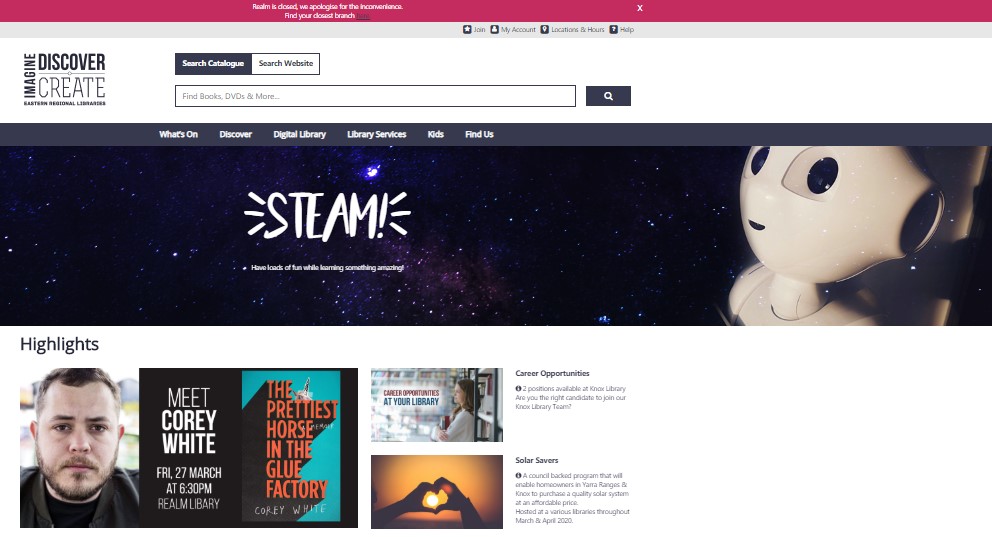
This week I have been exploring the website from my local public library, The Eastern Regional Library website, located at https://www.yourlibrary.com.au/.
The Eastern Regional Library site uses an ambiguous organisation scheme, with several well labelled bars. A number of which cover topical subject aspects such as, listing the variety of Services and Resources they offer. Their audience is specific to the local community, and their website supports them with a few task orientated functions such as: getting a Membership and searching the catalogue. Many of their links are labelled as Gambrell (2015) describes as the most common top navigation terms such as: Search, Services, About Us, Help and My Account.
While predominately a broad and shallow hierarchy website structure, there is one tab, the Library services tab, which has 12 menu items, some on which also have a third layer of choices. While this tab has a vast amount of important information it is organised alphabetically. For a list this long I would prefer to see it listed from the most to least popular for a faster and user-friendly navigation.
The site can be translated into many different languages, although the location of this facility is not prominent, but rather hidden at the bottom right hand corner of the home page. They also clearly lay out in a table hard copy books and their availability at each locality. Photos are appropriately tagged, although some are tagged with different “labels” that are official language rather than the more user-friendly text on the photo. The site is well spaced out and uncluttered allowing for easier accurate selection when using buttons to make selections. Their help link went to a variety of methods of contact, both online and by phone as well as a list of well laid out topical FAQ’s assisting a diverse range of patrons.
(Eastern regional Library, 2020)
What works:
Gambrell (2015) suggests that website users now have the expectation for a single “Google type” search box. As the Search function is the primary action a user takes on the library website the Eastern Regional Library has made their search box prominent on the home page. For me this is where Eastern Regional Library website excels, they have executed this extremely well, keeping navigation simple, and providing an easily found, large, dual-purpose bar supporting transferring between searching their site and their catalogue in a visually appealing simple way.
- I love the prominent position and strong use of colour for the closure of the largest branch and link to more information (pinned to the top)
- They have well placed links to join, login to account, location and hours and help
- They feature high priority marketing in a prime location
- They have separated their search into 4 main community area including, e and audio books, children, resources (books, dvds, games) and family history in prominent well labelled buttons (which are also links) to guide their patrons.
- Towards the bottom of the home page they offer quick visual links to popular resources (with a well-placed reminder that they can be placed on hold)
- Opportunity to subscribe to their newsletter
- Then great links to paperwork, popular activities, social media connections and other council-based resources. Linking a library’s website to their council’s homepage is a real must if your website is to be useable. (Scheeren, 2015).
What doesn’t work:
Unfortunately, the well placed and designed link to the closure of their largest library transferred their users to an older page which had not been updated with the branch’s new information. They should keep their website up to date and always have the most recent update date on the page (Scheeren, 2015).

(Eastern regional Library, 2020)
Suggest improvements:
- The tabs bar has the space to spread out the tab titles, also making them larger would be beneficial to older or visually impaired patrons.
- While a library has many functions and resources, I always prefer to see library related photos (of books, the facilities etc) rather than the prominent photo they have included which refers to writing.
- Not so much in layout but for accessibility, adult patrons can easily join online however those patrons aged under 18 cannot join online (and their parent/ guardian can also not join them up online), but rather they need to visit the library in person. This could limit the opportunity for younger patrons to access the many wonderful opportunities their local library has to offer them, which is disappointing.
Overall, I found the Eastern Regional Library website very user friendly, filled with readily accessible, mostly current, commonly sort after aspects of the library that their patrons would benefit from having access to online.
References:
Eastern regional Library. (2020). Retrieved from https://www.yourlibrary.com.au/
Gambrell, K. (2015). 7 best practices for creating a user friendly library website. Retrieved from https://www.ebsco.com/blog/article/7-best-practices-for-creating-a-user-friendly-library-website
Scheeren, W. (2015). Technology Handbook for School Librarians. ABC-CLIO.
Social media, privacy and democracy, in an online society

Picture reproduced under Creative Commons, accessed from Pixabay
The ABC (2017) article suggests that organisations are using algorithms that recommend what we see and do, combined with the manipulation of news through powerful search engines, are already impacting our everyday lives, even if we don’t realise it. So why would they then not influence how we are marketed at when casting our vote?
Initially reading the article I was surprised to find that the concept of data manipulation influencing democracy had made it into what I would regard as a reputable news source. It seems hardly unexpected given the data profiling I see every day when I undertake a google search or check Facebook. Seeing ‘promotional’ items integrated amongst anticipated results, which directly mimic recent activities I have made from other platforms. A google search of ‘camper trailer’ sees ads down the side of my page for the big brands, similarly ‘liking’ the camper trailer company on Facebook, my newsfeed is then peppered with their ‘posts’, constantly reminds me that my interaction is being monitored and the data they are collecting is being used to directly market to me.
However, my view quickly changed after a recent discussion in a secondary college staff room, where staff were excited to learn that photos from their phone could be viewed in a timeline format including dates and location. Rather than being concerned with data tracking, profiling their movements they instead enjoyed reminiscing about distant memories, even commenting how much they loved receiving their google timeline updates.
When I enquired if this collation of their private information bothers them, they seemed truly surprised. Commenting “no-one else can see it”, “its only photos” and “no, it’s just on my phone, but you do have to be careful what you say, they can listen you know”. Many agreed that they too had found ads for things they had spoken about near their phone, and that this was a big concern, even running their own investigations to test it, but never considered a connection to the marketing and their online activity.
Surprisingly finding confidential information is extremely easy to do, when people forget that Google will index a high proportion of material that goes online, and if they have not been careful about where material has been stored on a server, search engine spiders may well find it (Bradley, 2017).
NBC News (2018) found that while most people accept the Facebook business model, whereby their information is collected or shared, they also want to be told when something happens to their data. Although user’s confidence in the company plunged 66% when it was revealed that their data was inappropriately acquired, nevertheless this knowledge did not change their ingrained social media behaviour.
So, if people are aware of the consequences, why do they still choose to share their information? It would seem regardless of their knowledge about the possibility of loss of privacy they value their interaction with the internet more. With the rapid evolution of the internet many adults have had no formal instruction how their privacy is influenced by their interaction on the internet, so this concept is relatively new to them, and with busy lives many don’t have the time or inclination to investigate further. However, in today’s schools there is now defined curriculum to inform and educate our students about ‘cyber safety’ and ‘information literacy’. Growing up as digital natives with the necessary dissemination and critical thinking skills to evaluate internet sources and their intentions future generations will progress and be much better prepared and able to evaluate their choices and decisions to share information.
Overtime legislation will also need to progress to ensure companies cannot continue to take advantage. While countries such as the Uk, Italy, Germany and Canada have begun undertaking investigations on data security issues, and some have completed their reports, no formal decisions have been reached. However, organisations such as Privacy International who will continue to expose and challenge data exploitation are intent on pushing their demand for transparency, and accountability (Privacy International, 2019).
One of the things that drive our democracy is knowing where our information comes from. Information from Google or our Facebook feed, commonly does not identify the source or label it as propaganda — making it appear free and independent, therefore until we have the necessary digital literacy skills, we unfortunately will continue to be susceptible to these influences.
References:
ABC News. (2017). When algorithms control information, what of democracy? Retrieved from https://www.abc.net.au/news/2017-08-10/ai-democracy-google-facebook/8782970
Bradley, P. (2017). Expert Internet Searching: The Advanced Internet Searcher’s Handbook. London: Facet Publishing.
NBC News. (2018). Trust in Facebook has dropped by 66 percent since the Cambridge Analytica scandal. Retrieved from https://www.nbcnews.com/business/consumer/trust-facebook-has-dropped-51-percent-cambridge-analytica-scandal-n867011
Privacy International. (2019). Cambridge Analytica, GDPR – 1 year on – a lot of words and some action. Retrieved from https://privacyinternational.org/news-analysis/2857/cambridge-analytica-gdpr-1-year-lot-words-and-some-action
VR in school libraries

With VR headsets now at affordable prices, many school libraries are exploring the options that these new resources offer their staff and students in both educational and recreational purposes. Ranging in cost from the inexpensive Google cardboard to Class VR or Oculus Rift there are a variety of headsets that vary in their degree to immerse the users into a “reality” experience.
Within schools, students of all ages can use these resources for enjoyment through gaming or free play, but also for educational situations, quickly and economically visiting traditionally inaccessible spaces, such as perusing worldwide art galleries, witnessing historic events, traveling through the human body, exploring dangerous underwater wrecks or transforming into an astronaut and seeing the world from the perspective of space. While ‘gaming’ type programs such as Keep Talking and Nobody Explodes, are actually duel purpose, designed specifically to support team-building, their high interest and engaging tech format, would appeal to students who don’t enjoy participating in similar real life scenarios.
Although there is a great deal of interest in virtual reality, with many libraries hoping to implement them soon, and those that do reporting a definite increase in engagement, their introduction is often delayed due to lack of support within the library or those who govern it (Pope, 2018). These new high-tech resources take time and require personnel to learn, finding the time, opportunity and staff with an inclination to take up the challenge can be difficult. This is particularly problematic in schools with limited library staff who then need to find even more time to select the best resource and create an effective program that works with teaching staff.
When selecting Vr headsets it is important for each library to prioritise their community’s needs, while the Oculus Rift is commonly local schools preferred Vr headset, being a popular fully immersive virtual reality headset, staff at my school chose the Class VR headsets. Class VR has limited immersion as it does not support interaction from the user within the experience, rather they can only view it. Their rationale for selecting the alternative resource was due to the Class Vr being designed specifically for education, providing teaching staff the benefit of a lesson plan portal with full control and management of multiple headsets whereby they can view and monitor students’ progress (“ClassVR”, 2020).
Once schools have selected their preferred Vr resource, staff have other factors which need consideration, including responsibility and costs associated with maintenance of the equipment, consent requirements, safety issues, noise factors and creating and maintaining the space where the devices will be used.
Overall, I believe Vr resources are an exciting addition to a school library and I look forward to resolving the issues encountered with their introduction and supporting their evolution to broaden the learning experiences of staff and students.
References:
ClassVR – Virtual Reality for the Classroom. (2020). Retrieved from https://www.classvr.com/
Pope, H. (2018). Chapter 2. incorporating virtual and augmented reality in libraries. Library Technology Reports, 54(6), 8-11. Retrieved from https://access.library.unisa.edu.au/login?url=https://search-proquest-com.access.library.unisa.edu.au/docview/2099868562?accountid=14649
24/7 Libraries
The quiet town of Foster holds the auspicious title of becoming the inaugural 24/7 accessible library in Victoria. Local patrons can access the library outside of the usual staffed times, whenever their needs arise with an easy swipe of their library card. This convenience provides optimal opportunities for members who may work long or irregular hours to have full access the library’s physical resources, fitting in with their lifestyles and requirements. Whilst this may seem like a perfect solution, ensuring libraries remain relevant in increasingly busy and diverse lives it does bring forth security implications now and in the future.
Resident Ms Constable points out that in a small country town where “everyone knows everyone”, security may “not be a concern” (Maunder, 2019). However, this is unlikely to be case in many public libraries with larger communities where members don’t all know each other and may have different values and expectations of the facility. Accessing an unstaffed facility could see ambiguities in acceptable behaviour and practice that cannot be impartially addressed or rectified, possibly leading to personal safety and physical damage concerns. In the future communities are likely to continue to grow, increasing their user base and its diversity, possibly amplify these issues.
Additionally, the system of access that requires a library card has the potential to create cyber security issues. San Nicolas-Rocca & Burkhard (2019) conclude that patrons personal identifying information that would be necessary to issue the card to ensure accountability, would create concerns in data protection and how the facility used and stored that information. Furthermore, there are the risks of additional patron information such as tracking and image of their character, which is generated through their use of the facility encroaching on patron privacy and freedom of inquiry.
Overall, the concept of a library card allowing 24/7 access to all the amazing resources is very appealing, however it is important to recognise and have appropriate processes and guidelines firmly in place to ensure the protection of patron’s privacy is paramount.
References:
Maunder, S (2019, December 20). First library in Victoria to open 24 hours a day, seven days a week has town buzzing. ABC Gippsland. Retrieved from https://www.abc.net.au/news/2019-12-27/foster-library-first-in-victoria-to-open-24-hours-a-day/11777696/
San Nicolas-Rocca, T., & Burkhard, R. J. (2019). Information Security in Libraries. Information Technology and Libraries, 38(2), 58-71. https://doi.org/10.6017/ital.v38i2.10973
Week 2: A School Network
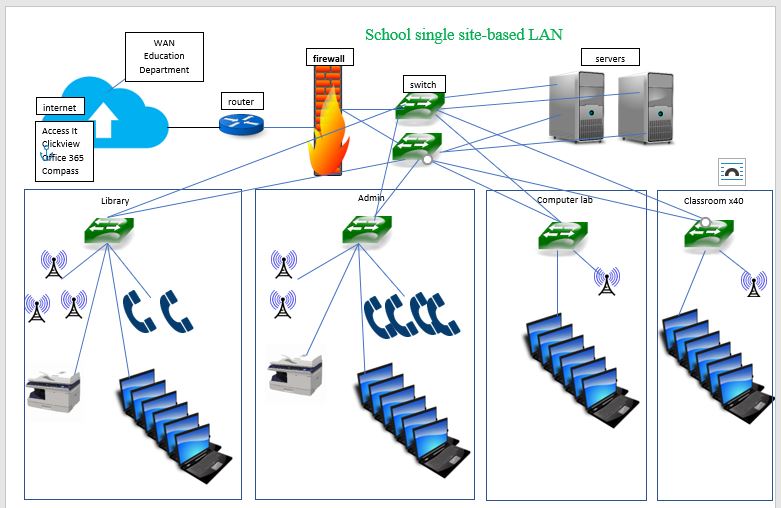
Whilst the first week of school is a busy time, I managed to sneak in some time with the IT team to discuss the setup of our local area network. We are a large metropolitan Secondary College school on a single location providing for 2 stakeholders, staff (around 130) and students (around 1065) it is predominantly based on a STAR Network with a BUS topology within some of the areas such as library and the office. The different areas of school are connected by redundant network connection back to the central switches. Staff and students have the ability to connect by wired or wireless methods. Also hosted on site is two servers, used for local file storage and local server applications.
Advantages of the system
The servers are configured with multiple network connections, protecting again connectivity loss if there is a switch failure. Having multiple servers allows for data redundancy ensuring a safer current storage of information. The data is backed up weekly using a cloud based service.
The switches used have been sized to allow future growth for more devices.
Disaster recovery is improved though the use of Uninterrupted Power Supplies (UPS) as outages are common due to electrical issues due to the aging buildings which has heightened during our current building program.
The governing body of the Education Department mandates high limitations on access through the firewall and proxy (running on one of the servers) which offers added security in regard to accessing inappropriate and dangerous sites, however this advantage becomes a disadvantage when access to required sites is limited to similar parameters.
Large numbers of Wireless access Ports (WAPS) provide large internet access zone across the college for the student’s computer devices at an economical price.
Disadvantages of the system
WAPS high load of devices is often flooded, as is the network, during peak times of the day (eg the morning mentor session) as almost 100% of users are accessing the network, and the connections between the switches can not keep up with the demand.
 Nickki's Tech Foundations Blog